บทความ

งานแก้ไข แยก อธิบายส่วนต่างๆของproject

รูปภาพ
HARDWARE 1.Arduino uno r3 2.bluetooth hc 06 3.2N2222 4.1N4007 5.relay 6.load INPUT 1.bluetooth hc 06 MCU 1.Arduino uno r3 OUTPUT 1.relay 2.load SOFTWARE #include <SoftwareSerial.h>                         เรียกใช้Library bluetooth const int rxPin = 4;                                         Rx PIN ใช้ขา4 const int txPin = 2;                                         TX PIN ใช้ขา2 SoftwareSerial mySerial(rxPin, txPin);         กำหนดค่าลงใน Library bluetooth const int Loads[] = {9, 10, 11, 12};              กำหนด ตัวแปร อาเรย์ int state = 0;                      ...
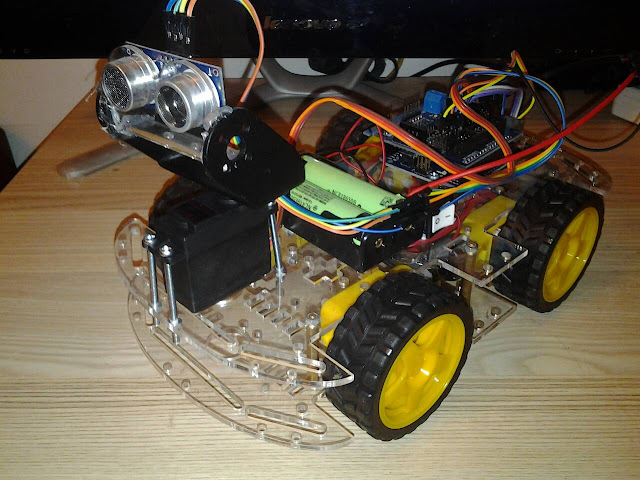
งานที่ 20 หุ่นยนต์ติดตามวัตถุ Ultrasonic

รูปภาพ
HARDWARE SOFTWARE #include <Servo.h> #include <NewPing.h> // Motor A pins (enableA = enable motor, pinA1 = forward, pinA2 = backward) int enableA = 3; int pinA1 = 6; int pinA2 = 7; //Motor B pins (enabledB = enable motor, pinB2 = forward, pinB2 = backward) int enableB = 5; int pinB1 = 8; int pinB2 = 9; #define TRIGGER_PIN  A0 // Arduino pin tied to trigger pin on the ultrasonic sensor. #define ECHO_PIN     A1  // Arduino pin tied to echo pin on the ultrasonic sensor. #define MAX_DISTANCE 25 // Maximum distance we want to ping for (in centimeters). Maximum sensor distance is rated at 400-500cm. NewPing sonar(TRIGGER_PIN, ECHO_PIN, MAX_DISTANCE); // NewPing setup of pins and maximum distance. Servo myservo;  // create servo object to control a servo // a maximum of eight servo objects can be created int pos = 23; int distance = 0; int stepsize = 5; int detect = 0; void setup() {   Serial.begin(115200); // Open serial monitor at 115200 baud ...

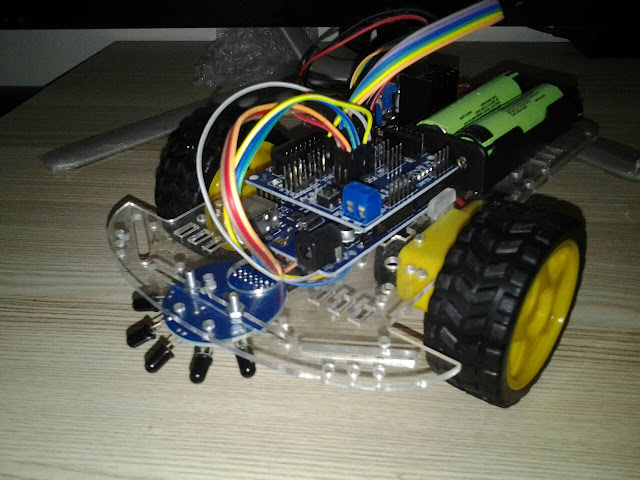
งานที่ 19 หุ่นยนต์เดินตาม เปลวไฟ Fire Extinguisher

รูปภาพ
HARDWARE SOFTWARE // Motor A pins (enableA = enable motor, pinA1 = forward, pinA2 = backward) int enableA = 3; int pinA1 = 6; int pinA2 = 7;   //Motor B pins (enabledB = enable motor, pinB2 = forward, pinB2 = backward) int enableB = 5; int pinB1 = 8; int pinB2 = 9;   int sensor[5] = {0, 0, 0, 0, 0};   void setup() {   pinMode(enableA, OUTPUT);   pinMode(pinA1, OUTPUT);   pinMode(pinA2, OUTPUT);     pinMode(enableB, OUTPUT);   pinMode(pinB1, OUTPUT);   pinMode(pinB2, OUTPUT);     enableMotors();   analogWrite(enableA, 120);  // ปรับค่าความเร็วของหุ่นยนต์   analogWrite(enableB, 120);  // ปรับค่าความเร็วของหุ่นยนต์     delay(2000);   }   void loop() {         sensor[0] = analogRead(A1);   sensor[1] = analogRead(A2);   sensor[2] = analogRead(A3);   sensor[3] = analogRead(A4)...